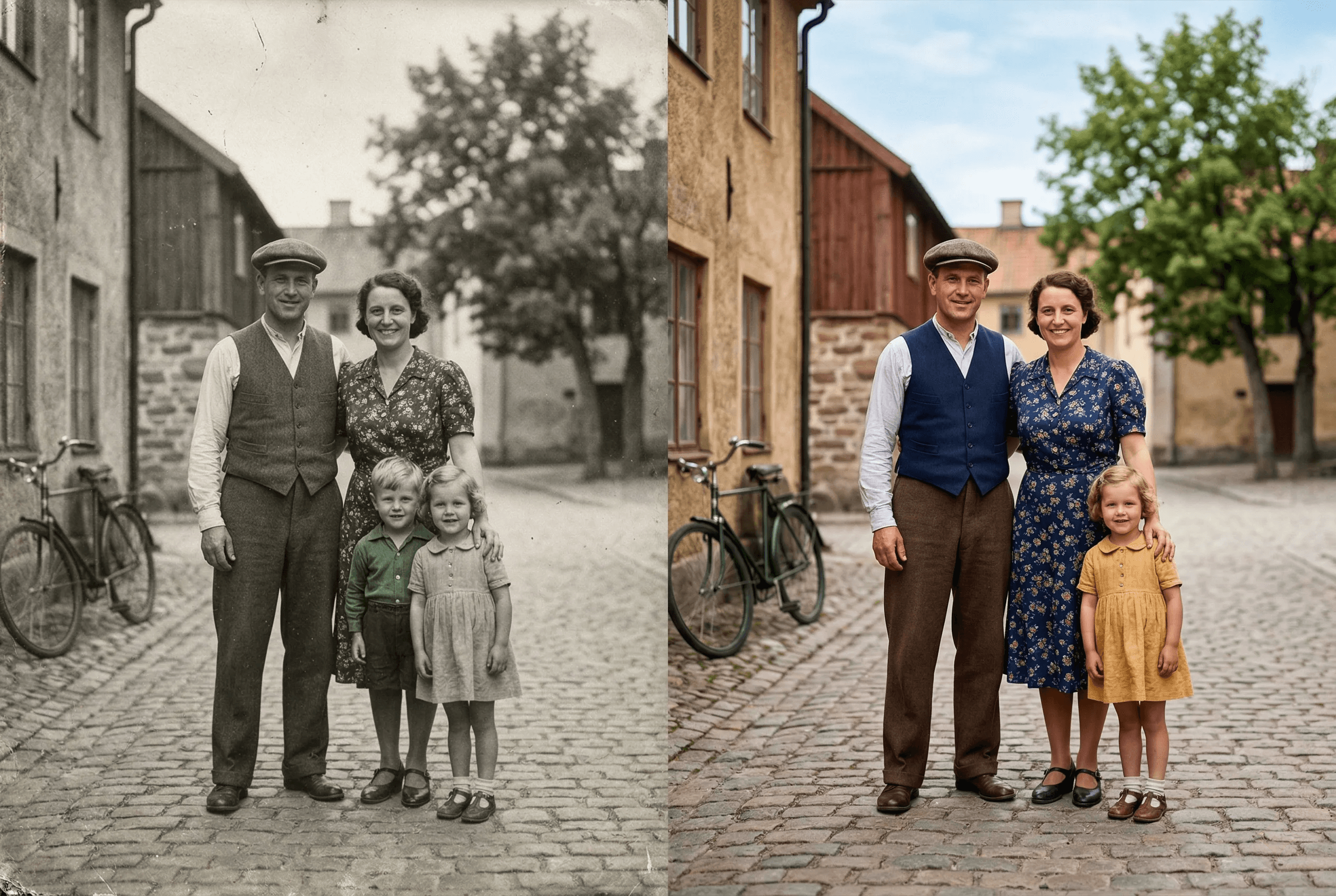
讓老照片煥發新生
先進 AI 理解場景並添加自然色彩。
自動識別人物、天空等
多種色調預設
自訂文字指定顏色
適用於老照片
保留畫質
支援批次上色
Realistic skin tones across ethnicities and lighting conditions
Natural sky, vegetation and clothing color choices
Pairs with image enhancement and upscaling for full restoration
使用步驟
只需幾步即可獲得專業效果。
1
上傳黑白照片
2
選擇色彩風格
3
AI 上色
4
下載結果
What People Colorize with ImageAI
Real situations where colorization brings new life to images that already mattered.
Old family photos and portraits
Grandparent weddings, childhood photos, mid-century family shots. Adds natural skin tone, clothing color and background color.
Historical photography
Pre-color-film era photos from the 1900s–1950s. Useful for educators, museums, documentary projects and family histories.
Vintage prints and scans
Scanned prints from the 1960s–1980s that were originally shot in B&W. Restore them as gift-ready color images.
Heritage and genealogy projects
Add color to ancestor photos for family trees, memorial slideshows and printed family books.
Restored film stills
Colorize stills from classic B&W cinema for fan projects, posters or video editing reference.
Editorial and content creation
History blogs, YouTube channels and social content often need colorized images. Generate them in seconds instead of paying a retoucher.
Colorization Output Specs
What the tool produces, and what it leaves alone.
| What gets colorized | Skin, clothing, vegetation, sky, water, common objects |
|---|---|
| What's preserved | Original resolution, composition, lighting and grain texture |
| Color style options | Natural, warm, cool, vintage, plus custom text prompt |
| Input formats | JPEG, PNG, WebP, HEIC (color or grayscale) |
| Output format | Full-color PNG by default |
| Average processing time | 5–15 seconds per image |
| Best source quality | Sharper input = more accurate colorization. Enhance first if grainy. |
| Cost | 2 credits per image — see pricing for details |
How it works
How AI Colorization Actually Picks the Colors
Old colorization tools worked by mapping grayscale values to a fixed color palette — a hand-coded shortcut that produced flat, fake-looking results. You could spot a 2010-era colorized photo from across a room.
Modern AI colorization is different. The model is trained on millions of color photos plus their grayscale versions, so it learns what color a scene 'should' be from context. It recognizes that a 1950s wedding dress is white, that grass is green in spring and golden in autumn, that skin tones vary with lighting and ethnicity, and that water in a sunset photo is warm-toned, not gray. Those decisions come from understanding the scene, not from a lookup table.
ImageAI's colorization model is steerable. By default it picks the most natural, contextually-correct colors for the image. With a text prompt — 'warm late-afternoon light', 'cool winter palette', 'vibrant 1970s color' — you can bias it toward a specific era or mood. For the highest-quality result on old prints, run the photo through Image Enhancement first to clean up scan noise, then colorize, then optionally Upscale for the final print size.
Where Colorization Gets Hard
Honest about the cases where you may need a second pass or a different tool.
Heavily damaged or torn photos
Scratches and tears confuse the AI's scene understanding. Restore the damage first (manual edit or AI restoration), then colorize.
Specific historical colors you want exact
The AI guesses plausible colors. If you need a specific military uniform color or known dress color, use a text prompt to specify.
Extremely low-resolution scans
Under ~500px on the long side, the AI has too little context. Upscale to at least 800px first, then colorize.
Photos with mixed B&W and tinted areas
Hand-tinted vintage photos confuse the model. Convert to pure grayscale first, then colorize for a consistent result.
常見問題
色彩逼真嗎?
是的,AI 使用場景理解技術。
能控制色彩嗎?
可以。
破損照片能處理嗎?
建議先增強修復。
哪類照片最適合 AI 上色?
主體清晰的銳利黑白照片(人像、家庭快照、風景、歷史街景)效果最好。嚴重模糊、超低解析度或手工染色過的圖片難度較高。經驗法則:肉眼能清楚看清的內容,AI 就能上色。
可以為特定人物上色並得到準確膚色嗎?
可以。模型能處理不同族裔與光線條件的膚色,並尊重原片的光線(室內暖光 vs. 戶外冷光)。如需微調,可加 prompt 例如「自然暖膚色,室內燈光」。
會保留原片的畫質嗎?
會。上色只加入色彩,不會改變解析度、構圖或顆粒。針對老掃描檔,最佳組合是:增強 → 上色 → 放大。
可以一次為多張老照片上色嗎?
可以——批次模式支援單一任務處理多張照片,適合數位化整本家庭相簿或歷史檔案。
上色一張照片要多少積分?
每張上色消耗 2 積分。新帳號有 30 個免費積分,可免費上色 15 張。更高用量方案見定價頁。