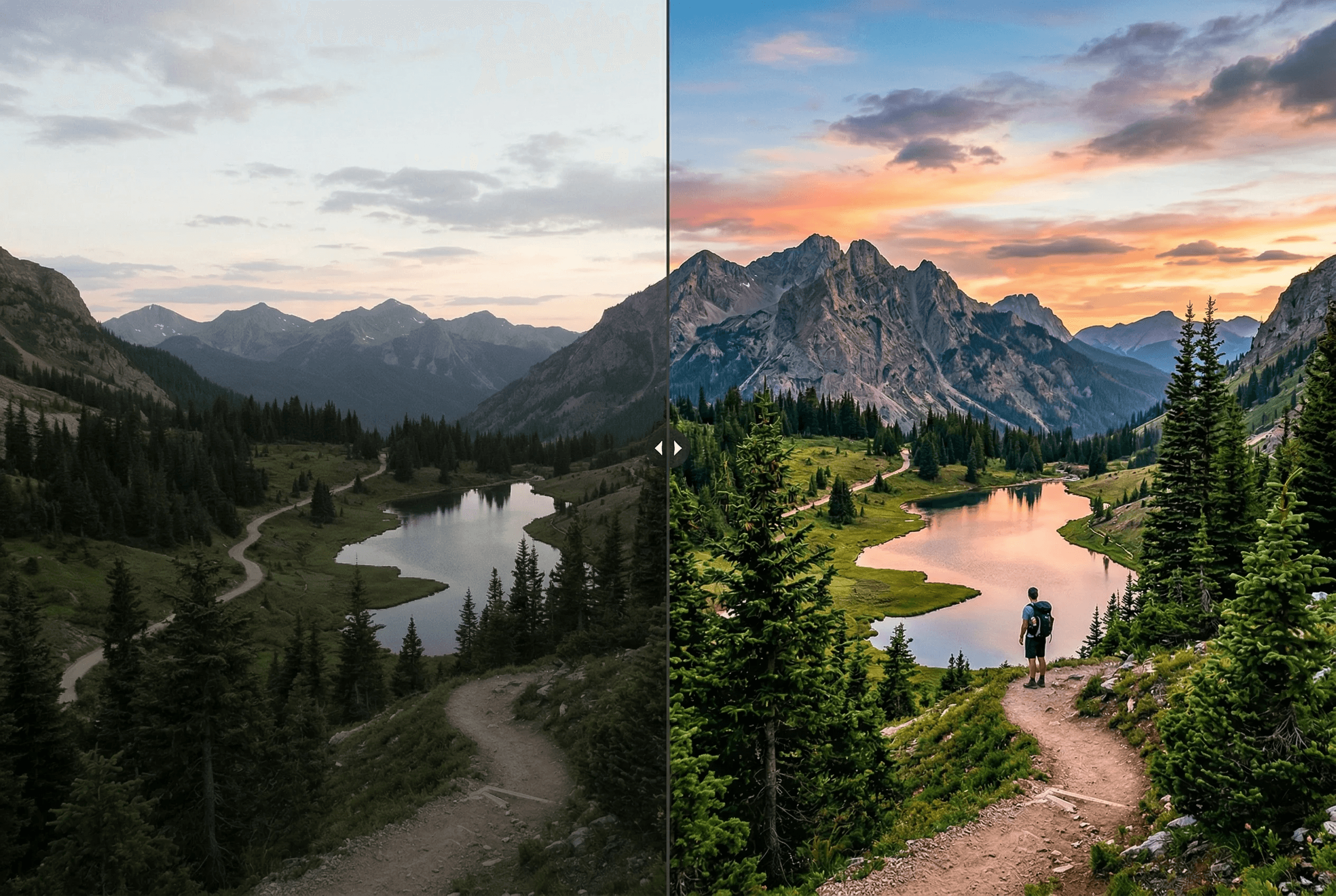
自動增強任何照片
智慧 AI 呈現最佳效果。
自動校正曝光和白平衡
智慧提升銳度和降噪
增強色彩飽和度
自訂文字指令控制增強方向
適用於任何照片
支援批次增強
Fixes underexposed indoor and night-time photos
Cleans up JPEG compression artifacts and grain
Preserves the original composition — no auto-cropping
使用步驟
只需幾步即可獲得專業效果。
1
上傳照片
2
可選輸入增強方向
3
AI 增強圖片
4
下載結果
What People Enhance with ImageAI
Real situations where one-click enhancement saves a photo — or a whole catalog.
Ecommerce product photos shot on phone
Fix uneven lighting, weak whites and dull color so a phone snapshot looks like a studio shot before it goes on Shopify or Amazon.
Underexposed indoor & restaurant photos
Recover detail in dark areas, fix mixed indoor lighting (tungsten + window), and brighten without crushing highlights.
Real estate listing photos
Brighten interiors, balance window light against room light, sharpen architectural detail — all in one pass.
Portraits with bad white balance
Fix orange tungsten cast or cool fluorescent cast on skin tones without manually adjusting curves.
Travel & landscape photos
Restore sky color, lift shadows in foreground subjects, sharpen distant detail.
Social media content pipeline
Run every Instagram, TikTok or Pinterest post through enhance for consistent brand-quality output.
Image Enhancer Output Specs
What the tool actually changes — and what it leaves alone.
| What gets enhanced | Exposure, white balance, contrast, sharpness, noise, color vibrancy |
|---|---|
| What's preserved | Composition, cropping, subject identity, original resolution |
| Custom prompt | Optional natural-language direction (e.g. 'make it warmer, more contrast') |
| Input formats | JPEG, PNG, WebP, HEIC |
| Output format | PNG by default, or matches your input |
| Average processing time | 3–8 seconds per image |
| Batch support | Yes — multi-image upload supported |
| Cost | 1 credit per image — see pricing for details |
How it works
Auto Enhance vs Manual Editing
Manual photo editing means dragging exposure sliders, eyeballing white balance, sharpening selectively, and denoising in tight crops. For one hero image, that's fine. For a 200-SKU catalog or a daily content pipeline, it's a part-time job.
AI image enhancement collapses that workflow into a single forward pass. The model analyzes the image — what kind of subject it contains, what the lighting looks like, where the noise is — and decides which corrections to apply and by how much. Because it sees the whole image as one signal, it can do things a slider-based workflow can't: lift shadows on a subject without blowing out a window behind them, sharpen detail in a face without amplifying noise in the background, fix a color cast on skin while leaving the wall color natural.
ImageAI's enhancer also accepts a natural-language prompt as steering. Add 'make it warmer and more contrasty' and the model biases toward that look. Add 'product photo, neutral white background' and it leans the other way. This gives you the speed of auto-enhance with the directional control of a manual edit — without ever opening an image editor.
When Enhancement Doesn't Help
A few cases where the enhancer is the wrong tool — and what to use instead.
Image is too small for the final use
Enhancement won't add resolution. If the source is 600px and you need 2000px, run the Image Upscaler first, then enhance.
Heavy motion blur or out-of-focus subject
Enhancement sharpens detail that exists. It can't recover detail that was never captured. Re-shoot if possible.
You need creative re-styling, not correction
If you want a 'film look' or 'oil painting' effect, use Style Transfer. Enhance only does corrections, not stylization.
Product photo with the wrong background
Enhance fixes lighting and color. It doesn't change the background — run Remove Background first if your subject is in front of a busy scene.
常見問題
能控制增強方式嗎?
可以!輸入文字描述精確控制。
手機照片能用嗎?
當然。
會改變構圖嗎?
不會。
適用於電商商品圖嗎?
適用——商品攝影是最常見的工作流之一。手機拍攝的商品圖經常出現光線不均、白色發灰、色彩沉悶等問題,跑一次增強就能達到可發布的品質。建議搭配去背景與放大工具一起使用。
影像增強器與影像放大器有什麼差別?
增強器在原解析度下修正畫質(曝光、色彩、銳利度、雜訊);放大器以 2 倍或 4 倍提升解析度並生成新細節。兩者解決不同問題、效果互補:先增強清理來源,再放大到所需尺寸。
可以去除低光環境照片的雜訊嗎?
可以。增強器專門檢測並降低 ISO 雜訊、JPEG 壓縮 artifact 與感光元件熱噪——而且不會像通用降噪那樣把細節抹平。
可以同時處理多張照片嗎?
可以——使用多圖上傳,將同一組增強設定套用到整批圖片。適用於電商目錄、房地產攝影或任何需要一致畫質的場景。
我的圖片資料會保密嗎?
上傳僅在增強任務執行期間存在暫存區,完成後自動刪除。我們不會出售你的圖片,也不會用來訓練第三方模型。企業級資料協議請走聯絡頁。