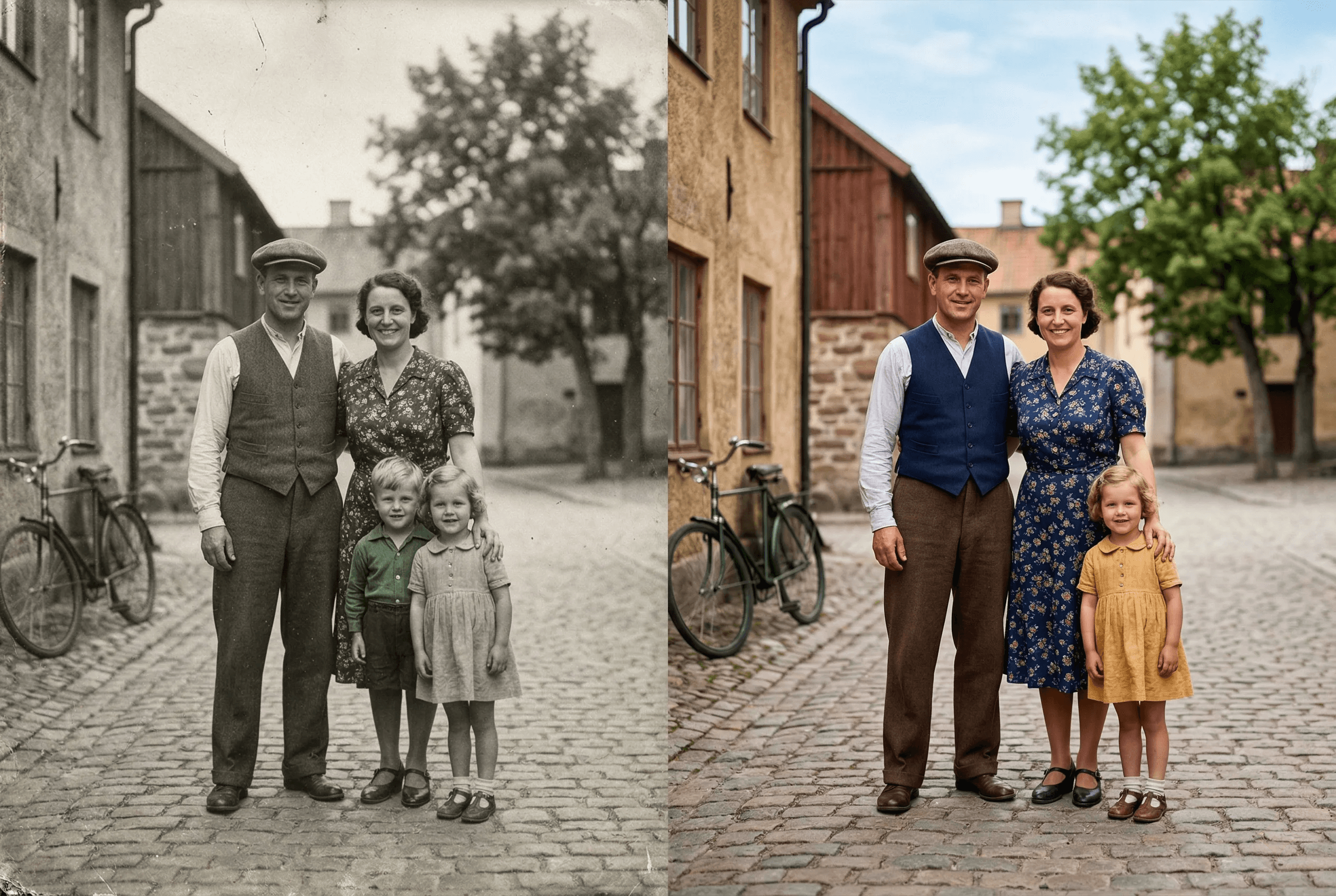
古い写真を蘇らせる
シーンを理解して自然な色を追加。
人物・空・植物を自動認識
複数のトーンプリセット
テキストで色指定
古い写真に対応
画質維持
バッチ着色対応
Realistic skin tones across ethnicities and lighting conditions
Natural sky, vegetation and clothing color choices
Pairs with image enhancement and upscaling for full restoration
使い方
数ステップでプロ品質の仕上がり。
1
白黒写真をアップロード
2
色スタイルを選択
3
AI着色
4
結果をダウンロード
What People Colorize with ImageAI
Real situations where colorization brings new life to images that already mattered.
Old family photos and portraits
Grandparent weddings, childhood photos, mid-century family shots. Adds natural skin tone, clothing color and background color.
Historical photography
Pre-color-film era photos from the 1900s–1950s. Useful for educators, museums, documentary projects and family histories.
Vintage prints and scans
Scanned prints from the 1960s–1980s that were originally shot in B&W. Restore them as gift-ready color images.
Heritage and genealogy projects
Add color to ancestor photos for family trees, memorial slideshows and printed family books.
Restored film stills
Colorize stills from classic B&W cinema for fan projects, posters or video editing reference.
Editorial and content creation
History blogs, YouTube channels and social content often need colorized images. Generate them in seconds instead of paying a retoucher.
Colorization Output Specs
What the tool produces, and what it leaves alone.
| What gets colorized | Skin, clothing, vegetation, sky, water, common objects |
|---|---|
| What's preserved | Original resolution, composition, lighting and grain texture |
| Color style options | Natural, warm, cool, vintage, plus custom text prompt |
| Input formats | JPEG, PNG, WebP, HEIC (color or grayscale) |
| Output format | Full-color PNG by default |
| Average processing time | 5–15 seconds per image |
| Best source quality | Sharper input = more accurate colorization. Enhance first if grainy. |
| Cost | 2 credits per image — see pricing for details |
How it works
How AI Colorization Actually Picks the Colors
Old colorization tools worked by mapping grayscale values to a fixed color palette — a hand-coded shortcut that produced flat, fake-looking results. You could spot a 2010-era colorized photo from across a room.
Modern AI colorization is different. The model is trained on millions of color photos plus their grayscale versions, so it learns what color a scene 'should' be from context. It recognizes that a 1950s wedding dress is white, that grass is green in spring and golden in autumn, that skin tones vary with lighting and ethnicity, and that water in a sunset photo is warm-toned, not gray. Those decisions come from understanding the scene, not from a lookup table.
ImageAI's colorization model is steerable. By default it picks the most natural, contextually-correct colors for the image. With a text prompt — 'warm late-afternoon light', 'cool winter palette', 'vibrant 1970s color' — you can bias it toward a specific era or mood. For the highest-quality result on old prints, run the photo through Image Enhancement first to clean up scan noise, then colorize, then optionally Upscale for the final print size.
Where Colorization Gets Hard
Honest about the cases where you may need a second pass or a different tool.
Heavily damaged or torn photos
Scratches and tears confuse the AI's scene understanding. Restore the damage first (manual edit or AI restoration), then colorize.
Specific historical colors you want exact
The AI guesses plausible colors. If you need a specific military uniform color or known dress color, use a text prompt to specify.
Extremely low-resolution scans
Under ~500px on the long side, the AI has too little context. Upscale to at least 800px first, then colorize.
Photos with mixed B&W and tinted areas
Hand-tinted vintage photos confuse the model. Convert to pure grayscale first, then colorize for a consistent result.
よくある質問
色はリアルですか?
はい。
色を制御できますか?
はい。
傷んだ写真は?
先に補正をお勧めします。
AIカラー化に最も適した写真は?
被写体が明確で、シャープなモノクロ写真(ポートレート、家族のスナップ、風景、歴史的な街景)が最も適しています。激しくぼけた写真、極端に低解像度の写真、手彩色済みの写真は難易度が上がります。目安:肉眼で何が写っているか明確に分かるなら、AIで着色できます。
特定の人物の写真を着色して、肌の色を正確に再現できますか?
はい。さまざまな民族・照明条件に対応した肌の色を扱えるほか、原画の光(温かい室内光 vs. 冷たい昼光)を尊重します。結果を微調整したい場合は「自然な暖色系の肌、室内ランプ照明」のようなプロンプトを指定してください。
元の写真の画質は保たれますか?
保たれます。カラー化は色を加えるだけで、解像度・構図・粒状感は変化しません。古いスキャン画像には Enhance → Colorize → Upscale の順がベストの組み合わせです。
複数の古い写真を一度にカラー化できますか?
はい——バッチモードで複数枚を1ジョブで処理できます。家族アルバム全体や歴史アーカイブのデジタル化に最適です。
1枚のカラー化に必要なコストは?
カラー化1回につき2クレジット。新規アカウントには30クレジットが無料付与されるため、15枚を無料で着色できます。大量利用向けプランは料金ページをご覧ください。