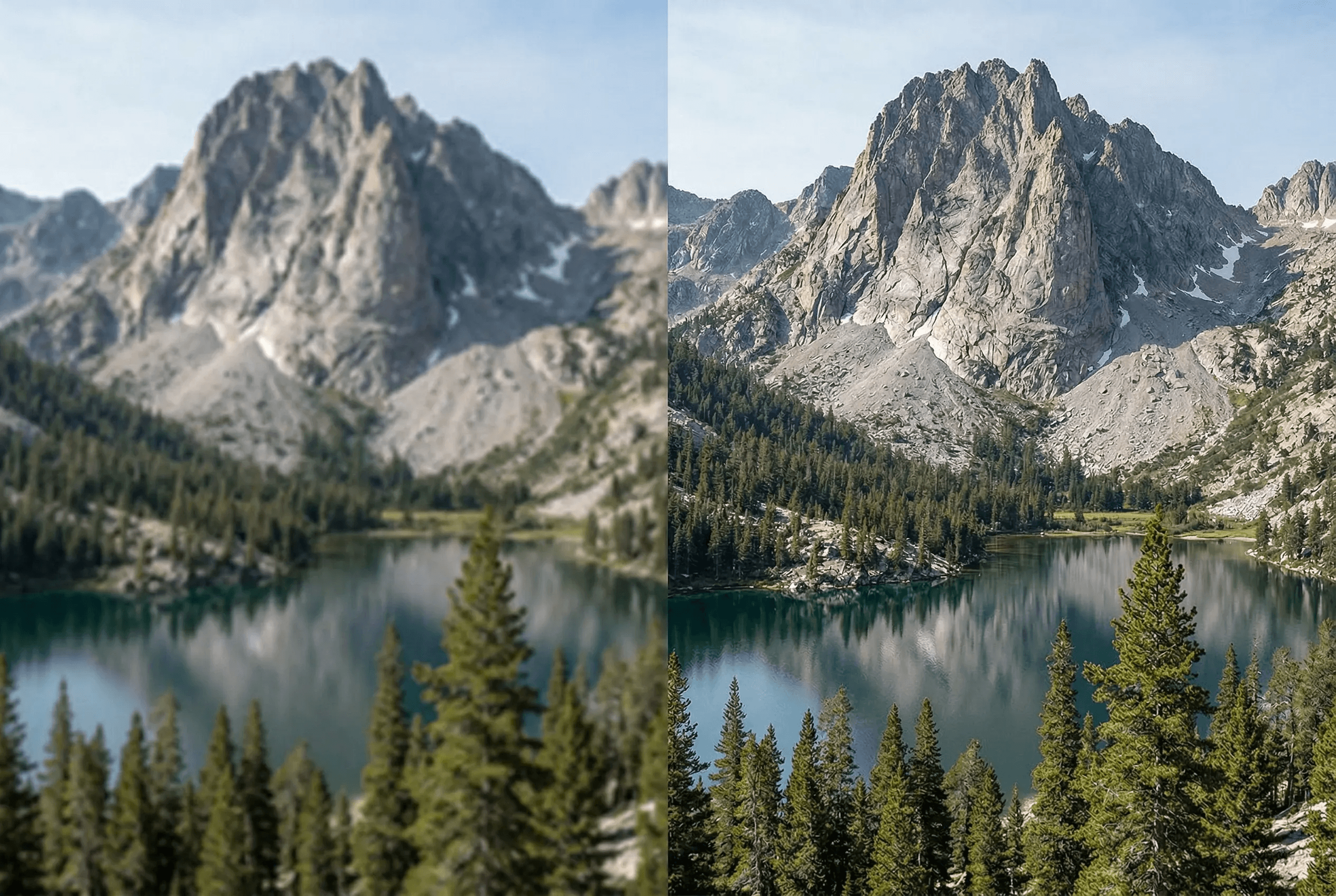
画質を保って拡大
AI超解像で本物のディテールを生成。
高速モード:ミリ秒で2倍拡大
クリエイティブモード:4倍拡大
色彩・テクスチャを維持
印刷・大型ディスプレイに最適
写真・イラスト・AI画像対応
複数出力形式
Sharp product photos for Shopify, Amazon, Etsy zoom-on-hover
Restores detail in old scans and phone snapshots
Batch upscale for whole product catalogs
使い方
数ステップでプロ品質の仕上がり。
1
低解像度画像をアップロード
2
拡大モードを選択
3
AIが解像度を向上
4
高解像度画像をダウンロード
What People Upscale with ImageAI
From ecommerce catalogs to old family photos, this is what the tool handles every day.
Product photos for Shopify & Amazon
Bring a 600px product shot up to 2400px so PDPs stay sharp on retina displays and zoom-on-hover doesn't look soft.
AI-generated images
Most text-to-image models cap at 1024px or 1536px. Upscale to 4x for hero banners, ads and large-format print.
Old photos and family scans
Recover detail in faded prints, low-res scans and small phone photos so they hold up at frame-size.
Print and large displays
Posters, billboards, trade-show backdrops — anything that needs 300 DPI at large dimensions.
Real estate and property photos
Sharpen and enlarge MLS-quality images for listing sites, virtual tours and brochures.
Social media at native resolution
Instagram, TikTok and Pinterest serve content at 1080–2160px wide. Upscale phone photos to land at the right pixel density.
Upscaler Output Specs
Exactly what you get out of the tool, so you can plan your workflow.
| Maximum upscale | 4x in Creative mode; 2x in Fast mode |
|---|---|
| Maximum input size | Up to 4096 × 4096 px source image |
| Maximum output size | Up to 16384 × 16384 px (effectively 4K → 16K) |
| Input formats | JPEG, PNG, WebP, HEIC |
| Output formats | PNG (lossless), JPEG (high quality), WebP |
| Average processing time | 1–4 seconds (Fast mode), 5–15 seconds (Creative mode) |
| Batch support | Yes — process multiple images in one job |
| API access | Available — see pricing page |
How it works
Super-Resolution vs Naive Upscaling
Traditional image enlargers — the kind built into image editors or browsers — use bicubic or Lanczos interpolation. Those methods average neighboring pixels to fill in gaps, so a 2x or 4x enlargement looks smooth but soft. Edges blur, fine textures disappear, and text becomes mushy.
AI super-resolution is fundamentally different. The model is trained on millions of low-res / high-res image pairs, so it learns what real detail looks like at higher resolutions. When you upscale, it doesn't just stretch pixels — it predicts the high-resolution content that was lost in the original. That's why an AI-upscaled photo can look genuinely sharper than the source, while a bicubic upscale only ever looks bigger.
ImageAI's upscaler offers two modes. Fast mode is a lightweight super-resolution model that does a clean 2x upscale in under a second — ideal for batch jobs and when the source is already decent quality. Creative mode uses a heavier generative model that can hallucinate plausible detail for 4x upscales, which is what you want for AI-generated images, low-res phone snapshots and old scans where there genuinely is no detail to recover.
Common Upscaling Pitfalls
Where AI upscalers tend to fail, and how to avoid each case.
Plastic-looking skin in portraits
Happens when Creative mode hallucinates too much texture on smooth faces. Use Fast mode for portraits, or follow up with face restoration for natural skin.
Garbled text in screenshots
Generative models can warp letterforms. For screenshots, charts and documents, prefer Fast mode at 2x or use a dedicated document upscaler.
Strange artifacts in repeating patterns
Fabrics with strong micro-patterns sometimes show banding. Try a lower upscale ratio (2x instead of 4x) or upscale before applying patterns in design work.
Source was already heavily JPEG-compressed
The upscaler will faithfully reproduce JPEG block artifacts. Run image enhancement first to clean up compression noise, then upscale.
よくある質問
高速モードとクリエイティブモードの違いは?
高速は2倍拡大。クリエイティブはAIが新しいディテールを生成して4倍拡大。
最大解像度は?
最大4倍拡大。
拡大後にぼやけますか?
いいえ。AIが実際のディテールを生成します。
Midjourney・DALL·E・Stable DiffusionなどのAI生成画像も拡大できますか?
はい。AI生成画像はこのツールの最適な用途のひとつです。テキスト→画像モデルの多くは1024〜2048pxが上限のため、4倍拡大することでヒーローバナー・広告・印刷など、解像度がボトルネックになる用途で活用できます。
ECの商品写真にも使えますか?
はい。600pxの商品写真を2400px以上に拡大するのは最も多い用途のひとつです。シャープなPDP画像はコンバージョンに直接影響します——ホバーズームでぼやけたピクセルが露出すると「品質の低いブランド」と認識されてしまいます。Image Enhancerと併用するとさらにクリーンな結果になります。
対応フォーマットは?
入力:JPEG、PNG、WebP、HEIC。出力:PNG(ロスレス)、JPEG(高品質)、WebPから後続ワークフローに合わせて選択可能。
バッチ拡大のAPIはありますか?
あります。同じ拡大エンジンがREST APIで提供されており、Shopifyの自動アップロード、ヘッドレスカタログ、独自の画像パイプラインに組み込めます。プラン詳細は料金ページ、エンタープライズ料金はお問い合わせページから。
拡大後、画像は保存されますか?
アップロードはジョブ実行中のみ一時ストレージに保持され、完了後は自動削除されます。画像を販売することも、第三者モデルの学習に使うこともありません。マスターファイルの所有権はあなたに残ります。