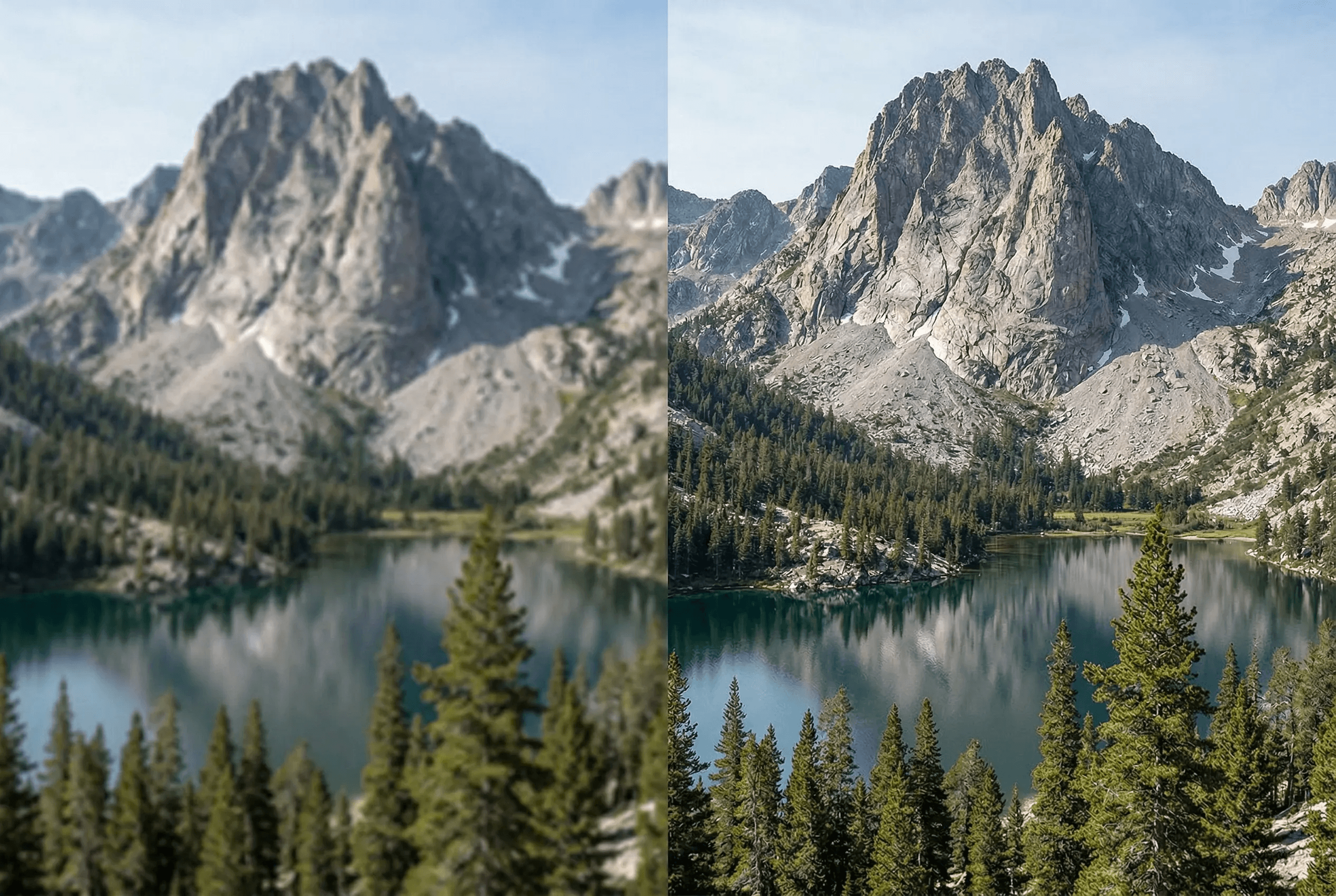
Upscale Without Losing Quality
AI-powered super-resolution that adds real detail — not just bigger pixels.
Fast mode: 2x upscale in milliseconds
Creative mode: AI-generated detail enhancement up to 4x
Preserves original colors, textures, and composition
Ideal for print, posters, and large-format displays
Works on photos, illustrations, and AI-generated images
Multiple output formats: PNG, JPEG, WebP
Sharp product photos for Shopify, Amazon, Etsy zoom-on-hover
Restores detail in old scans and phone snapshots
Batch upscale for whole product catalogs
So funktioniert es
In wenigen Schritten zu professionellen Ergebnissen.
1
Upload your low-resolution image
2
Choose upscale mode: Fast (2x) or Creative (4x)
3
AI enhances resolution with real detail
4
Download your high-resolution result
What People Upscale with ImageAI
From ecommerce catalogs to old family photos, this is what the tool handles every day.
Product photos for Shopify & Amazon
Bring a 600px product shot up to 2400px so PDPs stay sharp on retina displays and zoom-on-hover doesn't look soft.
AI-generated images
Most text-to-image models cap at 1024px or 1536px. Upscale to 4x for hero banners, ads and large-format print.
Old photos and family scans
Recover detail in faded prints, low-res scans and small phone photos so they hold up at frame-size.
Print and large displays
Posters, billboards, trade-show backdrops — anything that needs 300 DPI at large dimensions.
Real estate and property photos
Sharpen and enlarge MLS-quality images for listing sites, virtual tours and brochures.
Social media at native resolution
Instagram, TikTok and Pinterest serve content at 1080–2160px wide. Upscale phone photos to land at the right pixel density.
Upscaler Output Specs
Exactly what you get out of the tool, so you can plan your workflow.
| Maximum upscale | 4x in Creative mode; 2x in Fast mode |
|---|---|
| Maximum input size | Up to 4096 × 4096 px source image |
| Maximum output size | Up to 16384 × 16384 px (effectively 4K → 16K) |
| Input formats | JPEG, PNG, WebP, HEIC |
| Output formats | PNG (lossless), JPEG (high quality), WebP |
| Average processing time | 1–4 seconds (Fast mode), 5–15 seconds (Creative mode) |
| Batch support | Yes — process multiple images in one job |
| API access | Available — see pricing page |
How it works
Super-Resolution vs Naive Upscaling
Traditional image enlargers — the kind built into image editors or browsers — use bicubic or Lanczos interpolation. Those methods average neighboring pixels to fill in gaps, so a 2x or 4x enlargement looks smooth but soft. Edges blur, fine textures disappear, and text becomes mushy.
AI super-resolution is fundamentally different. The model is trained on millions of low-res / high-res image pairs, so it learns what real detail looks like at higher resolutions. When you upscale, it doesn't just stretch pixels — it predicts the high-resolution content that was lost in the original. That's why an AI-upscaled photo can look genuinely sharper than the source, while a bicubic upscale only ever looks bigger.
ImageAI's upscaler offers two modes. Fast mode is a lightweight super-resolution model that does a clean 2x upscale in under a second — ideal for batch jobs and when the source is already decent quality. Creative mode uses a heavier generative model that can hallucinate plausible detail for 4x upscales, which is what you want for AI-generated images, low-res phone snapshots and old scans where there genuinely is no detail to recover.
Common Upscaling Pitfalls
Where AI upscalers tend to fail, and how to avoid each case.
Plastic-looking skin in portraits
Happens when Creative mode hallucinates too much texture on smooth faces. Use Fast mode for portraits, or follow up with face restoration for natural skin.
Garbled text in screenshots
Generative models can warp letterforms. For screenshots, charts and documents, prefer Fast mode at 2x or use a dedicated document upscaler.
Strange artifacts in repeating patterns
Fabrics with strong micro-patterns sometimes show banding. Try a lower upscale ratio (2x instead of 4x) or upscale before applying patterns in design work.
Source was already heavily JPEG-compressed
The upscaler will faithfully reproduce JPEG block artifacts. Run image enhancement first to clean up compression noise, then upscale.
Häufig gestellte Fragen
What's the difference between Fast and Creative mode?
Fast mode provides a quick 2x upscale. Creative mode uses advanced AI to generate new detail for a 4x upscale with enhanced sharpness.
What's the maximum resolution I can achieve?
You can upscale up to 4x the original resolution. For example, a 1000x1000 image can become 4000x4000.
Will the upscaled image look blurry?
No. Unlike simple interpolation, our AI model generates real detail and texture, producing sharp, natural-looking results.
Kann ich KI-generierte Bilder aus Midjourney, DALL·E oder Stable Diffusion hochskalieren?
Ja. KI-generierte Bilder sind einer der besten Anwendungsfälle für dieses Tool, da die meisten Text-zu-Bild-Modelle bei 1024–2048 Pixeln gedeckelt sind. Skalieren Sie auf 4x für Hero-Banner, Werbung, Druck und jeden Kontext, in dem die Quellauflösung der Engpass ist.
Funktioniert es für E-Commerce-Produktfotos?
Ja — 600px-Produktfotos auf 2400px+ hochzuskalieren ist einer der häufigsten Anwendungsfälle. Scharfe PDP-Bilder beeinflussen die Conversion direkt: Zoom-on-Hover, der weiche Pixel offenlegt, wird von Käufern als „minderwertige Marke“ gelesen. Kombinieren Sie mit dem Image Enhancer für das sauberste Ergebnis.
Welche Bildformate unterstützt der Upscaler?
Eingabe: JPEG, PNG, WebP, HEIC. Ausgabe: PNG (verlustfrei), JPEG (hohe Qualität) oder WebP — je nachdem, was in Ihren nachgelagerten Workflow passt.
Gibt es eine API für Batch-Upscaling?
Ja. Derselbe Upscaler läuft hinter einer REST-API, die Sie in Shopify-Auto-Uploads, Headless-Kataloge oder Ihre eigene Bildpipeline einklinken können. Plan-Details auf der Preisseite, Enterprise-Tarife über die Kontaktseite.
Wird mein Bild nach dem Upscaling gespeichert?
Uploads werden für die Dauer Ihres Jobs verarbeitet und dann automatisch aus dem temporären Speicher gelöscht. Wir verkaufen Ihre Bilder nicht und trainieren keine Drittmodelle damit. Ihre Master-Dateien bleiben Ihre.
Related guides & tools
Weitere Tools entdecken
Remove Image Background Instantly
Remove backgrounds from any image in seconds with AI precision.
AI Image Expander — Extend Canvas
Extend image canvas in any direction with seamless AI fill.
AI Object Eraser — Remove Unwanted Objects
Remove unwanted objects from photos with AI-powered fill.
AI Inpainting — Edit Specific Areas
Mask and regenerate specific areas of an image with AI.