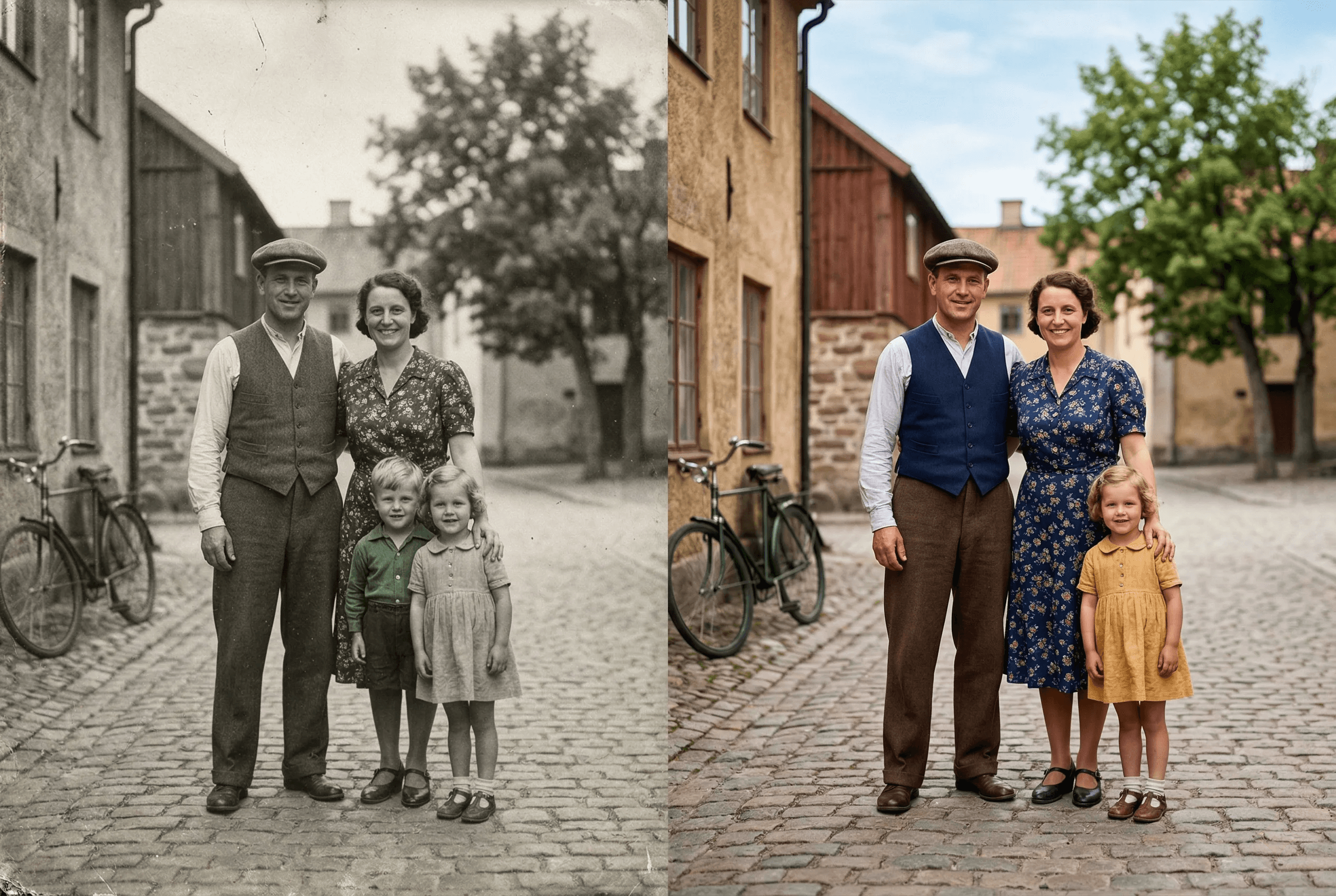
Bring Old Photos to Life
State-of-the-art AI that understands scenes and adds natural colors.
Auto-detects people, sky, vegetation, and objects
Multiple tone presets: warm, cool, vintage, natural
Custom prompt for specific color preferences
Works on old family photos, historical images, and more
Preserves the original image quality and detail
Process multiple photos in batch mode
Realistic skin tones across ethnicities and lighting conditions
Natural sky, vegetation and clothing color choices
Pairs with image enhancement and upscaling for full restoration
Como funciona
Obtenha resultados profissionais em poucos passos.
1
Upload your black-and-white photo
2
Choose a color style or let AI decide
3
AI analyzes the scene and adds color
4
Download your colorized photo
What People Colorize with ImageAI
Real situations where colorization brings new life to images that already mattered.
Old family photos and portraits
Grandparent weddings, childhood photos, mid-century family shots. Adds natural skin tone, clothing color and background color.
Historical photography
Pre-color-film era photos from the 1900s–1950s. Useful for educators, museums, documentary projects and family histories.
Vintage prints and scans
Scanned prints from the 1960s–1980s that were originally shot in B&W. Restore them as gift-ready color images.
Heritage and genealogy projects
Add color to ancestor photos for family trees, memorial slideshows and printed family books.
Restored film stills
Colorize stills from classic B&W cinema for fan projects, posters or video editing reference.
Editorial and content creation
History blogs, YouTube channels and social content often need colorized images. Generate them in seconds instead of paying a retoucher.
Colorization Output Specs
What the tool produces, and what it leaves alone.
| What gets colorized | Skin, clothing, vegetation, sky, water, common objects |
|---|---|
| What's preserved | Original resolution, composition, lighting and grain texture |
| Color style options | Natural, warm, cool, vintage, plus custom text prompt |
| Input formats | JPEG, PNG, WebP, HEIC (color or grayscale) |
| Output format | Full-color PNG by default |
| Average processing time | 5–15 seconds per image |
| Best source quality | Sharper input = more accurate colorization. Enhance first if grainy. |
| Cost | 2 credits per image — see pricing for details |
How it works
How AI Colorization Actually Picks the Colors
Old colorization tools worked by mapping grayscale values to a fixed color palette — a hand-coded shortcut that produced flat, fake-looking results. You could spot a 2010-era colorized photo from across a room.
Modern AI colorization is different. The model is trained on millions of color photos plus their grayscale versions, so it learns what color a scene 'should' be from context. It recognizes that a 1950s wedding dress is white, that grass is green in spring and golden in autumn, that skin tones vary with lighting and ethnicity, and that water in a sunset photo is warm-toned, not gray. Those decisions come from understanding the scene, not from a lookup table.
ImageAI's colorization model is steerable. By default it picks the most natural, contextually-correct colors for the image. With a text prompt — 'warm late-afternoon light', 'cool winter palette', 'vibrant 1970s color' — you can bias it toward a specific era or mood. For the highest-quality result on old prints, run the photo through Image Enhancement first to clean up scan noise, then colorize, then optionally Upscale for the final print size.
Where Colorization Gets Hard
Honest about the cases where you may need a second pass or a different tool.
Heavily damaged or torn photos
Scratches and tears confuse the AI's scene understanding. Restore the damage first (manual edit or AI restoration), then colorize.
Specific historical colors you want exact
The AI guesses plausible colors. If you need a specific military uniform color or known dress color, use a text prompt to specify.
Extremely low-resolution scans
Under ~500px on the long side, the AI has too little context. Upscale to at least 800px first, then colorize.
Photos with mixed B&W and tinted areas
Hand-tinted vintage photos confuse the model. Convert to pure grayscale first, then colorize for a consistent result.
Perguntas frequentes
How realistic are the colors?
Our AI uses advanced scene understanding to add contextually accurate colors. Skin tones, sky, vegetation, and objects are colored naturally.
Can I control the color output?
Yes! You can choose between warm, cool, vintage, and natural presets, or provide specific instructions via text prompt.
Does it work on very old or damaged photos?
The colorization AI works on most black-and-white images. For best results with damaged photos, we recommend enhancing the image first.
Que tipos de foto funcionam melhor para a colorização com IA?
Fotos P&B nítidas com sujeitos claros (retratos, instantâneos familiares, paisagens, cenas de rua históricas) funcionam melhor. Imagens muito desfocadas, de resolução muito baixa ou já coloridas à mão são mais complicadas. Regra prática: se você consegue ver claramente o que está na foto, a IA consegue colorizar.
Posso colorizar a foto de uma pessoa específica e obter o tom de pele certo?
Sim. O modelo lida com tons de pele de diferentes etnias e condições de luz, e respeita a iluminação original (luz interna quente vs. luz natural fria). Se precisar ajustar o resultado, use um prompt como «tom de pele quente natural, luz de luminária interna».
Preserva a qualidade original da foto?
Sim. A colorização adiciona cor mas não altera resolução, composição ou grão. Para escaneamentos antigos, a melhor combinação é: enhance → colorize → upscale.
Posso colorizar várias fotos antigas de uma vez?
Sim — o modo lote permite processar várias fotos em um único job. Útil para digitalizar um álbum de família inteiro ou um arquivo histórico.
Quanto custa colorizar uma foto?
Cada colorização custa 2 créditos. Novas contas começam com 30 créditos gratuitos, então você pode colorizar 15 fotos sem pagar. Planos de maior volume na página de preços.
Related guides & tools
Explorar mais ferramentas
Remove Image Background Instantly
Remove backgrounds from any image in seconds with AI precision.
AI Image Expander — Extend Canvas
Extend image canvas in any direction with seamless AI fill.
AI Object Eraser — Remove Unwanted Objects
Remove unwanted objects from photos with AI-powered fill.
AI Inpainting — Edit Specific Areas
Mask and regenerate specific areas of an image with AI.