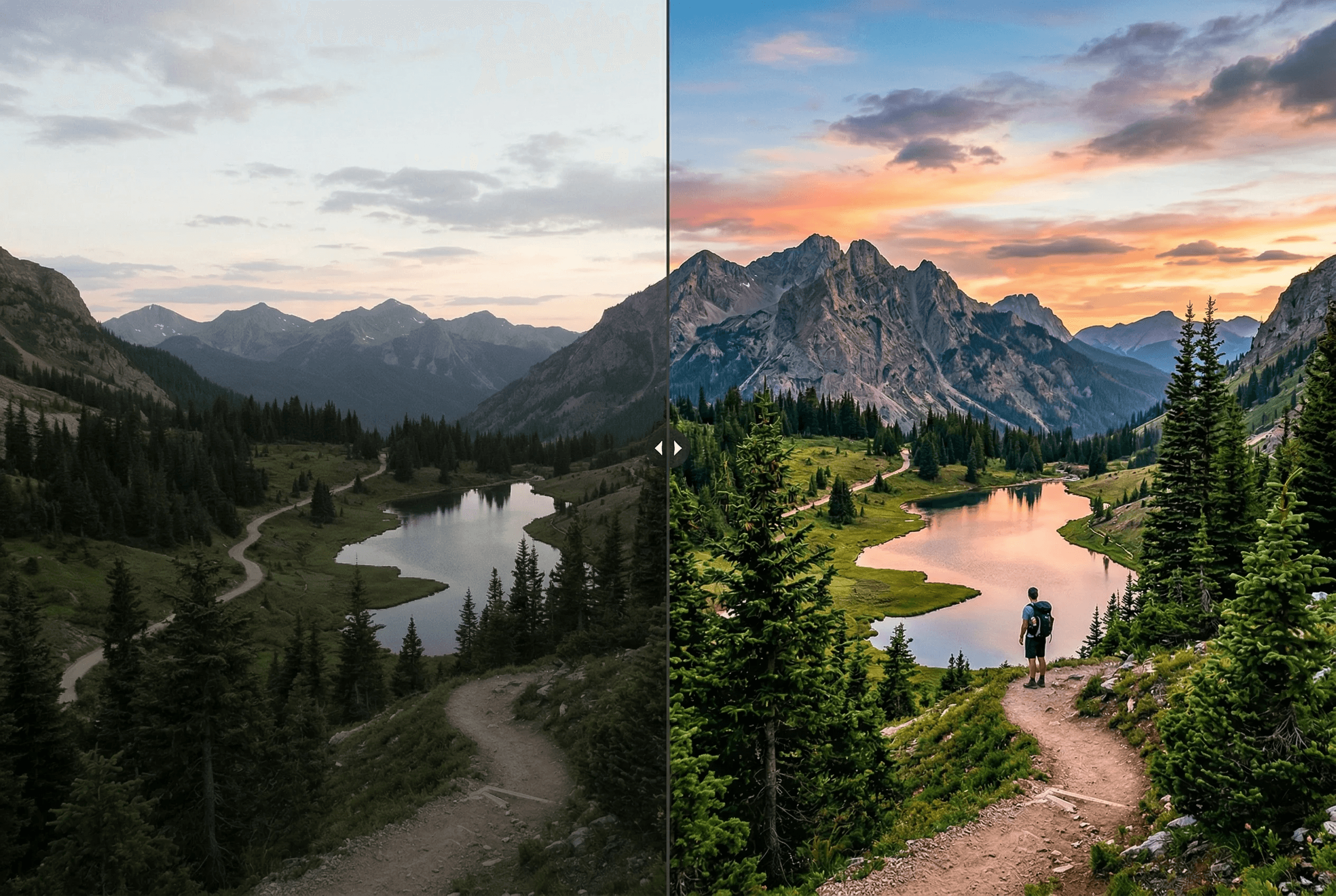
Enhance Any Photo Automatically
Advanced AI that understands your image and makes it look its best.
Auto-correct exposure, white balance, and contrast
Improve sharpness and reduce noise intelligently
Boost color vibrancy without oversaturation
Custom prompt: describe exactly how you want it enhanced
Works with portraits, landscapes, products, and any photo
Batch enhancement for multiple images
Fixes underexposed indoor and night-time photos
Cleans up JPEG compression artifacts and grain
Preserves the original composition — no auto-cropping
कैसे काम करता है
कुछ आसान स्टेप्स में प्रोफेशनल रिजल्ट पाएं।
1
Upload your photo
2
Optionally add enhancement directions
3
AI analyzes and enhances your image
4
Download the enhanced result
What People Enhance with ImageAI
Real situations where one-click enhancement saves a photo — or a whole catalog.
Ecommerce product photos shot on phone
Fix uneven lighting, weak whites and dull color so a phone snapshot looks like a studio shot before it goes on Shopify or Amazon.
Underexposed indoor & restaurant photos
Recover detail in dark areas, fix mixed indoor lighting (tungsten + window), and brighten without crushing highlights.
Real estate listing photos
Brighten interiors, balance window light against room light, sharpen architectural detail — all in one pass.
Portraits with bad white balance
Fix orange tungsten cast or cool fluorescent cast on skin tones without manually adjusting curves.
Travel & landscape photos
Restore sky color, lift shadows in foreground subjects, sharpen distant detail.
Social media content pipeline
Run every Instagram, TikTok or Pinterest post through enhance for consistent brand-quality output.
Image Enhancer Output Specs
What the tool actually changes — and what it leaves alone.
| What gets enhanced | Exposure, white balance, contrast, sharpness, noise, color vibrancy |
|---|---|
| What's preserved | Composition, cropping, subject identity, original resolution |
| Custom prompt | Optional natural-language direction (e.g. 'make it warmer, more contrast') |
| Input formats | JPEG, PNG, WebP, HEIC |
| Output format | PNG by default, or matches your input |
| Average processing time | 3–8 seconds per image |
| Batch support | Yes — multi-image upload supported |
| Cost | 1 credit per image — see pricing for details |
How it works
Auto Enhance vs Manual Editing
Manual photo editing means dragging exposure sliders, eyeballing white balance, sharpening selectively, and denoising in tight crops. For one hero image, that's fine. For a 200-SKU catalog or a daily content pipeline, it's a part-time job.
AI image enhancement collapses that workflow into a single forward pass. The model analyzes the image — what kind of subject it contains, what the lighting looks like, where the noise is — and decides which corrections to apply and by how much. Because it sees the whole image as one signal, it can do things a slider-based workflow can't: lift shadows on a subject without blowing out a window behind them, sharpen detail in a face without amplifying noise in the background, fix a color cast on skin while leaving the wall color natural.
ImageAI's enhancer also accepts a natural-language prompt as steering. Add 'make it warmer and more contrasty' and the model biases toward that look. Add 'product photo, neutral white background' and it leans the other way. This gives you the speed of auto-enhance with the directional control of a manual edit — without ever opening an image editor.
When Enhancement Doesn't Help
A few cases where the enhancer is the wrong tool — and what to use instead.
Image is too small for the final use
Enhancement won't add resolution. If the source is 600px and you need 2000px, run the Image Upscaler first, then enhance.
Heavy motion blur or out-of-focus subject
Enhancement sharpens detail that exists. It can't recover detail that was never captured. Re-shoot if possible.
You need creative re-styling, not correction
If you want a 'film look' or 'oil painting' effect, use Style Transfer. Enhance only does corrections, not stylization.
Product photo with the wrong background
Enhance fixes lighting and color. It doesn't change the background — run Remove Background first if your subject is in front of a busy scene.
अक्सर पूछे जाने वाले सवाल
Can I control how the image is enhanced?
Yes! You can add a text prompt describing what you want improved — like 'make it warmer' or 'increase contrast and sharpness'.
Does it work on phone photos?
Absolutely. It's designed to turn smartphone photos into professional-looking images by fixing common issues like poor lighting and noise.
Will it change my image composition?
No. Enhancement only adjusts quality attributes like lighting, colors, and sharpness — the composition stays exactly the same.
क्या यह ई-कॉमर्स उत्पाद फोटो के लिए काम करता है?
हां — उत्पाद फोटोग्राफी सबसे आम वर्कफ़्लो में से एक है। फोन-शॉट उत्पाद फोटो में अक्सर असमान रोशनी, नरम सफेद और सुस्त रंग होते हैं। एन्हांस से एक पास उन्हें प्रकाशन-योग्य गुणवत्ता तक लाता है। पूर्ण वर्कफ़्लो के लिए Remove Background और Upscaler के साथ जोड़ें।
Image Enhancer और Image Upscaler में क्या अंतर है?
Enhancer मौजूदा रिज़ॉल्यूशन पर गुणवत्ता (रोशनी, रंग, शार्पनेस, शोर) ठीक करता है। Upscaler नया विवरण उत्पन्न करते हुए रिज़ॉल्यूशन को 2x या 4x बढ़ाता है। वे अलग समस्याओं को हल करते हैं और अच्छी तरह जुड़ते हैं: पहले स्रोत साफ़ करने के लिए एन्हांस करें, फिर अंतिम आकार के लिए अपस्केल करें।
क्या यह कम-रोशनी वाली फोटो से शोर हटाएगा?
हां। एन्हांसर विशेष रूप से ISO शोर, JPEG कंप्रेशन आर्टिफैक्ट और सेंसर गर्मी से रंग शोर का पता लगाता है और कम करता है — जेनेरिक डिनॉइज़र की तरह बारीक विवरण को धुंधला किए बिना।
क्या मैं एक बार में कई फोटो प्रोसेस कर सकता हूं?
हां — पूरे बैच पर समान एन्हांसमेंट सेटिंग्स चलाने के लिए मल्टी-इमेज अपलोड का उपयोग करें। ई-कॉमर्स कैटलॉग, रियल एस्टेट शूट या किसी भी मामले के लिए उपयोगी जहां आपको कई इमेजेज़ में सुसंगत उपचार की आवश्यकता हो।
क्या मेरा इमेज डेटा निजी रखा जाता है?
अपलोड आपकी एन्हांसमेंट जॉब की अवधि के लिए प्रोसेस किए जाते हैं और फिर अस्थायी स्टोरेज से स्वचालित रूप से हटा दिए जाते हैं। हम आपकी इमेजेज़ नहीं बेचते या तृतीय-पक्ष मॉडल को प्रशिक्षित करने के लिए उपयोग नहीं करते। एंटरप्राइज़ डेटा समझौतों के लिए संपर्क पृष्ठ देखें।
Related guides & tools
और टूल्स देखें
Remove Image Background Instantly
Remove backgrounds from any image in seconds with AI precision.
AI Image Expander — Extend Canvas
Extend image canvas in any direction with seamless AI fill.
AI Object Eraser — Remove Unwanted Objects
Remove unwanted objects from photos with AI-powered fill.
AI Inpainting — Edit Specific Areas
Mask and regenerate specific areas of an image with AI.